Posts
-
How to type special characters in Gnome and Ubuntu
Despite using Gnome for ages, I've never bothered to work out how to type special characters, like ™ or ©. I've normally just opened the Character Map application and copied from there - obviously this is a bit of a round about process.
I finally decided to look it up and it's as simple as: Ctrl-Shift and the character code from Gnome's Character Map application.
So to type ™, go to Applications > Accessories > Character Map. Then note the character code:
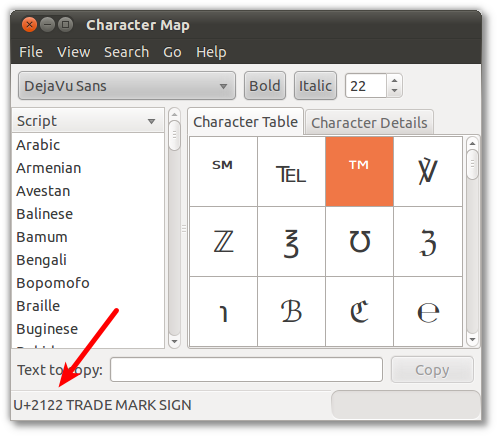
Hold down Ctrl + Shift and type u2122. Simple.
-
How to encrypt a disk partition in Linux

LUKS is the standard for Linux hard disk encryption. The following few commands are all you need to encrypt your next external hard disk or USB key on a Debian-based distribution like Ubuntu.
Installation
Install the required software and load the module into the running kernel without restarting:
sudo aptitude install cryptsetup
sudo modprobe dm_crypt
Drive creation
Set up encryption on the disk and mount it:
sudo cryptsetup luksFormat /dev/sdb1
sudo cryptsetup luksOpen /dev/sdb1 external
sudo mkfs.ext4 /dev/mapper/external
sudo mount /dev/mapper/external /mnt
Mounting
How to mount the drive:
sudo cryptsetup luksOpen /dev/sdb1 external
sudo mount /dev/mapper/external /mnt
Unmounting
How to unmount the drive:
sudo umount /mnt sudo cryptsetup luksClose external -
TrackPoint scrolling in Ubuntu 10.10
I just upgraded to Ubuntu 10.10 on my ThinkPad and the only issue so far is that TrackPoint scrolling had stopped working. To re-enable it I used GPointingDeviceSettings and set the following settings:
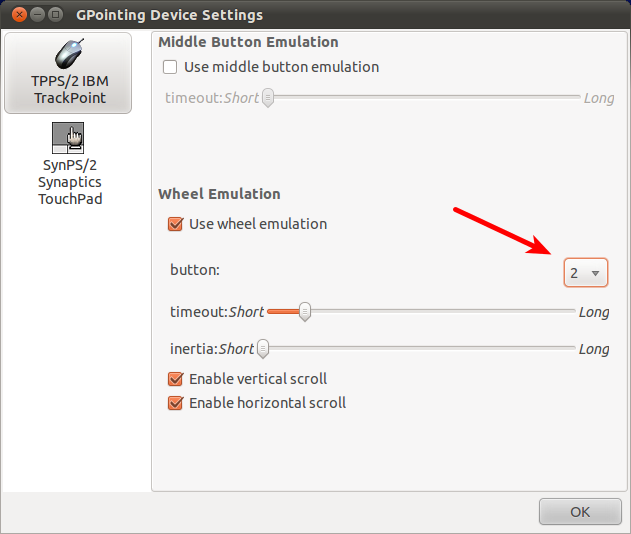
The important change was to set the wheel emulation’s button to 2, not 4 as it appeared to have been set to. If you don’t have GPointingDeviceSettings installed:
sudo apt-get install gpointing-device-settingsUpdate:
This original method didn’t survive a power-cycle but I found adding this file to
/usr/share/X11/xorg.conf.d/20-thinkpad.confwill work:Section "InputClass" Identifier "Trackpoint Wheel Emulation" MatchProduct "TrackPoint" MatchDevicePath "/dev/input/event*" Driver "evdev" Option "EmulateWheel" "true" Option "EmulateWheelButton" "2" Option "Emulate3Buttons" "false" Option "XAxisMapping" "6 7" Option "YAxisMapping" "4 5" EndSection -
Build an SMS to email gateway in under ten minutes
If you use an SMS gateway, such as Clickatell, to send SMS from your website or computer, you might want to set up your own simple return path for people to reply to those SMS and have them emailed to you.
With an always-on Ubuntu 10.04 machine, an old mobile phone and a cheap pre-paid SIM, you can have this setup in under 10 minutes.
First, install the required software; the Gammu SMS daemon for getting the SMS off the mobile and Mutt for sending our emails.
$ sudo apt-get install gammu-smsd muttPut this little shell script somewhere like
/var/spool/gammu/mail_wrapper.sh, customising the email addresses. It will be used to send the email when an SMS is received:#!/bin/bash export EMAIL="SMS Daemon <sms@example.com>" echo | mutt you@example.com -i "/var/spool/gammu/inbox/$1" -a "/var/spool/gammu/inbox/$1" -s "SMS Received"Attach your phone to your computer (mine was USB) and select “Phone mode” or similar on the mobile (as opposed to mass storage mode or photo mode, for example). Follow your system log to see what port your mobile shows up on, you should see output similar to this:
$ tail -f /var/log/syslog
Sep  6 09:00:22 smsgateway kernel: [105224.650743] usb 1-4: new high speed USB device using ehci_hcd and address 6
Sep  6 09:00:22 smsgateway kernel: [105224.991701] usb 1-4: configuration #3 chosen from 1 choice
Sep  6 09:00:22 smsgateway kernel: [105224.995894] cdc_acm 1-4:3.1: ttyACM0: USB ACM device
Sep  6 09:00:22 smsgateway kernel: [105224.997427] cdc_acm 1-4:3.3: ttyACM1: USB ACM device
Sep  6 09:00:22 smsgateway kernel: [105225.000013] cdc_wdm 1-4:3.7: cdc-wdm0: USB WDM device
The logs above show my mobile exposing two USB modem ports,
/dev/ttyACM0and/dev/ttyACM1. Trial and error lead me to discover that/dev/ttyACM1was the port I was looking for.Now configure this port in your
/etc/gammu-smsdrcfile with the lineport = /dev/ttyACM1and add the linerunonreceive = /var/spool/gammu/mail_wrapper.shso that the script we created earlier is executed when an SMS is received. The complete/etc/gammu-smsdrcfile should look similar to this:# Configuration file for Gammu SMS Daemon # Gammu library configuration, see gammurc(5) [gammu] # Please configure this! port = /dev/ttyACM1 connection = at # Debugging #logformat = textall # SMSD configuration, see gammu-smsdrc(5) [smsd] service = files logfile = syslog # Increase for debugging information debuglevel = 0 # Paths where messages are stored inboxpath = /var/spool/gammu/inbox/ outboxpath = /var/spool/gammu/outbox/ sentsmspath = /var/spool/gammu/sent/ errorsmspath = /var/spool/gammu/error/ runonreceive = /var/spool/gammu/mail_wrapper.shNow start Gammu’s smsd and, with the configuration above, Gammu will log activity to syslog so you can send an SMS and see the fruits of your labour:
$ sudo service gammu-smsd start
 * Starting Gammu SMS Daemon gammu-smsd                                                                                                                                   [ OK ]
$ tail -f /var/log/syslog
Sep  6 09:09:00 smsgateway gammu-smsd[11229]: Configuring Gammu SMSD...
Sep  6 09:09:00 smsgateway gammu-smsd[11229]: SHM token: 0xffffffff
Sep  6 09:09:00 smsgateway gammu-smsd[11229]: Warning: No PIN code in /etc/gammu-smsdrc file
Sep  6 09:09:00 smsgateway gammu-smsd[11229]: commtimeout=30, sendtimeout=30, receivefrequency=0, resetfrequency=0
Sep  6 09:09:00 smsgateway gammu-smsd[11229]: checks: security=1, battery=1, signal=1
Sep  6 09:09:00 smsgateway gammu-smsd[11229]: deliveryreport = no
Sep  6 09:09:00 smsgateway gammu-smsd[11229]: phoneid =
Sep  6 09:09:00 smsgateway gammu-smsd[11229]: Inbox is "/var/spool/gammu/inbox/" with format "standard"
Sep  6 09:09:00 smsgateway gammu-smsd[11229]: Outbox is "/var/spool/gammu/outbox/" with transmission format "7bit"
Sep  6 09:09:00 smsgateway gammu-smsd[11229]: Sent SMS moved to "/var/spool/gammu/sent/"
Sep  6 09:09:00 smsgateway gammu-smsd[11229]: SMS with errors moved to "/var/spool/gammu/error/"
Sep  6 09:09:00 smsgateway gammu-smsd[11232]: Using FILES service
Sep  6 09:09:00 smsgateway gammu-smsd[11232]: Starting phone communication...
Sep  6 09:09:13 smsgateway gammu-smsd[11232]: Received message from +61412345678
Sep  6 09:09:13 smsgateway gammu-smsd[11232]: Received IN20100902_165719_00_+61412345678_00.txt
Sep  6 09:09:13 smsgateway gammu-smsd[11258]: Starting run on receive: "/var/spool/gammu/mail_wrapper.sh" IN20100902_165719_00_+61412345678_00.txt
Sep  6 09:09:13 smsgateway gammu-smsd[11232]: Process finished successfully
If you run into any problems or need some help, please leave a comment below.
Note that there are more sophisticated ways of setting this up and many gateway providers have a much easier method to achieve the same result without you having to set up anything.
-
GNU gettext find and replace

GNU gettext is used by many open source projects for translation support.
If you need to just do a find and replace in gettext source files, try this out to do a whole directory at once:
for i in *.po; do
  echo "Processing $i"
  msgfilter --no-wrap sed -e "s/OLD_TEXT/NEW_TEXT/g" < $i > /tmp/gettext
  mv /tmp/gettext $i
done
I couldn’t find a way to do the edit in place (a la
sed -i), if you know of a way please let me know in the comments.
subscribe via RSS